
VS Code
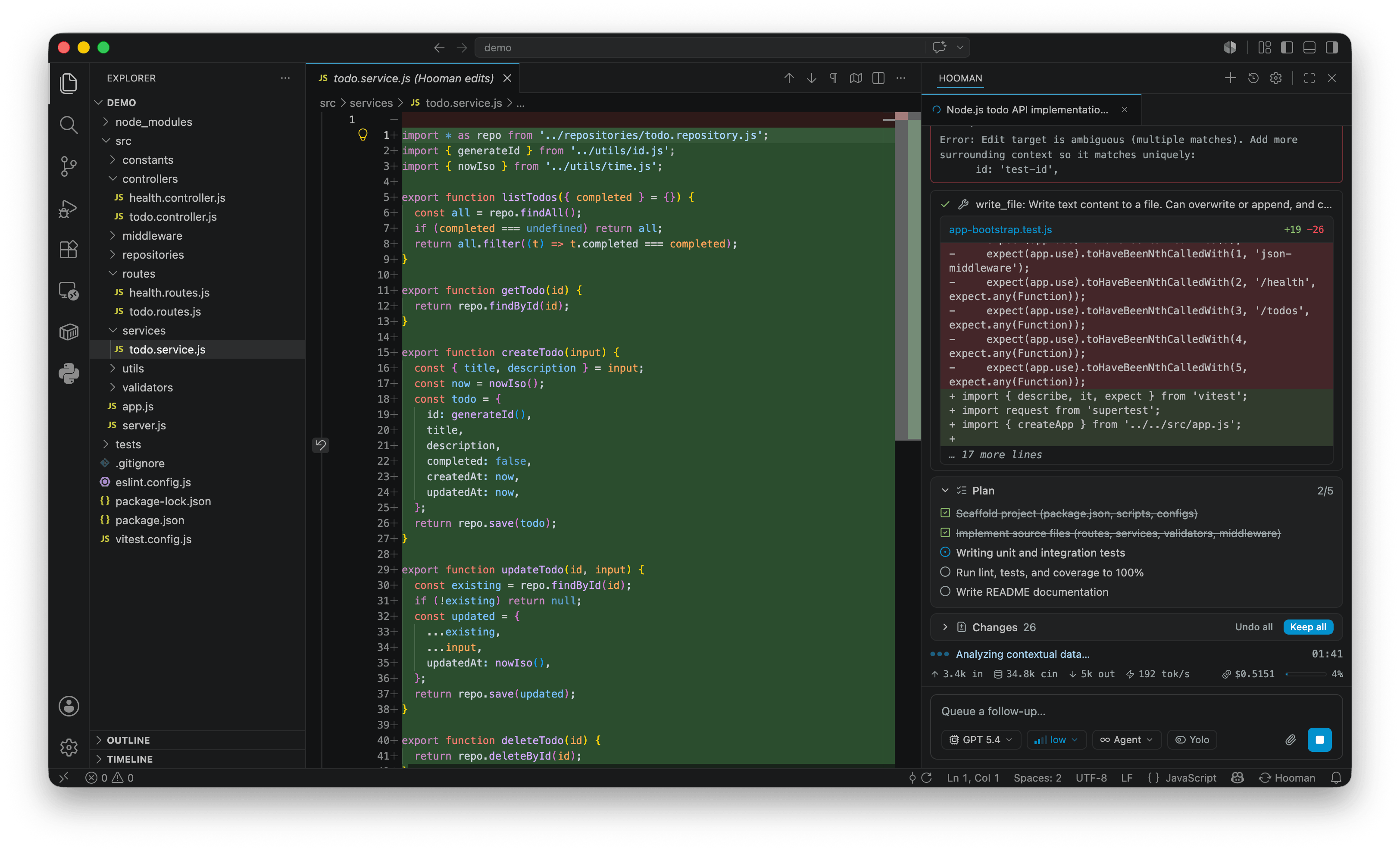
src/vscode/ ships a self-contained VS Code extension (hoomanjs-vscode) that bridges hooman acp into the editor with a native Hooman chat panel in the activity bar — the same open-source, local-first runtime as the CLI.
Works in stable VS Code, VS Code Insiders, and compatible forks — no proposed APIs and no special subscription required. Local-first and enterprise-friendly: your configuration, API keys, and sessions live in ~/.hooman on your machine — no account, no telemetry. MIT licensed; bring your own keys or inference endpoints.
Install it from the VS Code Marketplace, or see the VS Code quickstart for step-by-step setup.
Features
Section titled “Features”- Streaming chat with full markdown rendering (including clickable links, tables, and live Mermaid diagrams from fenced
mermaidcode blocks), and collapsible thinking (with a “thought for Xs · ~N tokens” summary). - Multi-tab sessions: work several chat sessions side by side in the same panel via a tab strip — open, switch, reorder, and close tabs without losing any in-flight turn.
- Tool-call cards with live status — shell commands stream their output into the card as they run. Long-running commands can detach as background terminals; a strip above the composer lists them with status and a Stop control (see shell background jobs). Failed requests that Hooman retries show a retry card with attempt count and backoff instead of silently failing. Stopping a turn cancels pending permission prompts and marks unfinished tool cards as cancelled. The transcript also sticks to the bottom while you follow a live turn (and when you send a new message).
- Review every edit: files the agent writes appear in a pinned Changes panel. Click a file to open a native diff against its pre-edit baseline, then Keep or Undo each change (or all at once). Edits go through undo-able workspace edits, and the agent sees your unsaved buffers.
- Plan checklist pinned above the transcript, updated live as the agent works through it, backed by a dedicated Plan editor custom view for
*.plan.mdfiles (checklist + Mermaid in the plan body).switch_modealways requires explicit approval (including leaving plan), even with Yolo/auto-approve on. - Message actions: copy any message, or fork the chat from each turn’s final assistant reply into a new session/tab. On a user message that still has an in-memory checkpoint, Revert restores files touched from that turn onward, rewinds agent history, and puts the prompt back in the composer (native confirmation dialog; not available for replayed history).
- Queue and steer: follow-ups sent mid-turn land in a Queued panel where you can edit, remove, or Send now. Steer now injects the queue as guidance into the running turn instead of waiting for it to finish.
- Attachments: add files, folders, and images via the paperclip button, drag & drop, or paste from the clipboard. Right-click a file in the Explorer (or select text in an editor) for Add to Hooman Chat / Add to New Hooman Chat (and the selection-scoped variants) to send it straight into the panel. Attachments are filtered to modalities the active model supports — see LLM metadata.
- Sessions persist: a Sessions overlay lists saved sessions grouped by day, searchable, with the ongoing one marked, click-to-open, per-session delete, and a New Chat action.
- Composer controls for session mode (Agent / Plan / Ask / Design), model, reasoning effort, and a separate Yolo toggle (auto-approve tool calls — not a mode), plus
/slash-command autocomplete (/compact,/init). Design mode uses Simple Browser forpreview_designand the same plan/Changes chrome for other modes. - Inline permission prompts: the agent asks before running destructive tools; approve or reject right in the panel (Yolo auto-approves — except
switch_mode, which always prompts). Destructive deletes and revert use VS Code’s native confirmation dialogs. - Status bar item showing the current model and mode, with a spinner while a turn runs and a quick menu for all session controls.
- Token-usage footer with real-time accumulated token counts for the in-flight turn plus the latest request’s input / cached / output counts, a context-window gauge, and cumulative session cost — see LLM metadata.
- Model download strip: when a local llama.cpp model downloads its weights on first use, a progress strip shows percent, size, speed, and ETA above the composer.
- Native settings editors: dedicated custom editors for
config.json(providers, models, prompts, tools, compaction, and fields such astopP/ modality metadata) andmcp.json(add/edit/remove servers with field-by-field forms), plus a Skills panel to search, install, refresh, and remove skills — all without leaving VS Code.instructions.mdopens in VS Code’s default Markdown editor. These read/write the same nearest project-local.hooman/overlay or~/.hooman/files the CLI uses. - First-run setup: when
~/.hooman/config.jsonis missing, the panel shows the same setup wizard ashooman setupbefore chat starts.
Quick start
Section titled “Quick start”-
Install Node.js
>= 24(npxships with it — that’s all the extension needs). -
Install the extension from the Marketplace.
-
Click the Hooman icon in the activity bar. If
~/.hooman/config.jsonis missing, a setup wizard runs in the panel (same flow ashooman setup): pick inference + search, validate credentials, write config. After that, chat opens and the extension launches the agent vianpx hoomanjs acp(CLI downloaded on first use — no separate install). -
Setup defaults to local llama.cpp (Gemma 4 E2B / Qwen3.5 2B); on Apple Silicon you can choose MLX. Hosted providers are in the same wizard. Later changes: Open Settings… (gear),
npx hoomanjs config, ornpx hoomanjs setup.See Configuration and Models for the full schema.
Commands
Section titled “Commands”- Hooman: New Chat — start a fresh session (new tab) in the chat panel.
- Hooman: Open Session… — opens the Sessions overlay: saved sessions grouped by day, searchable, ongoing marked, click-to-open, per-session delete.
- Hooman: Open Settings… — opens the native Configuration editor for
config.json, scaffolding it first if needed;mcp.jsonopens in the Hooman MCP custom editor when opened directly,instructions.mdopens in the default Markdown editor, and a Skills panel manages installed skills. - Add to Hooman Chat / Add to New Hooman Chat — Explorer context-menu commands that send the selected file(s) into the current or a new chat tab.
- Add Selection to Hooman Chat / Add Selection to New Hooman Chat — editor context-menu commands (shown when text is selected) that send the selection into the current or a new chat tab.
- Hooman: Show Output Channel — opens the “Hooman” output channel with the agent’s logs.
- Hooman: Delete All Sessions — deletes every persisted session after a confirmation prompt.
Extension settings
Section titled “Extension settings”By default the extension runs the agent through npx, resolving hoomanjs on demand. If you’d rather pin a specific binary or a local build:
| Setting | Default | Purpose |
|---|---|---|
hooman.acp.command |
npx |
Executable used to launch the agent. |
hooman.acp.args |
["hoomanjs", "acp"] |
Arguments passed to the command above. |
{ "hooman.acp.command": "node", "hooman.acp.args": ["/absolute/path/to/hooman/dist/cli.js", "acp"]}Everything else — providers, models, API keys, MCP servers, skills — is Hooman’s own configuration under ~/.hooman/, shared with the CLI.
Troubleshooting
Section titled “Troubleshooting”- Nothing happens / the panel says the agent failed to start — run Hooman: Show Output Channel. It logs the spawned process’s stderr and connection activity.
- First prompt is slow —
npxmay be downloadinghoomanjson first use; subsequent launches use the cache. - Wrong or no model — the agent uses your
~/.hooman/config.json. Verify it works in a terminal withnpx hoomanjs exec "hello".
Development
Section titled “Development”The extension lives in src/vscode/ of the Hooman repository as a self-contained sub-package (its own package.json and dependencies, excluded from the root build).
cd src/vscodenpm installnpm run compile # typecheck + esbuild (extension host) + vite build (webview)npm run watch # rebuild all three on savenpm run package # -> hoomanjs-vscode-<version>.vsix (fully bundled, no node_modules)Install the packaged .vsix into any VS Code-compatible editor:
code --install-extension hoomanjs-vscode-<version>.vsixTo debug, open the repository root in VS Code (after running npm install in src/vscode/ at least once) and press F5 — the root .vscode/launch.json and .vscode/tasks.json point at src/vscode, so there’s no need to cd in or open it as a separate workspace.
Architecture in brief: one hooman acp process serves the panel for the extension’s lifetime, with every chat session multiplexed over it as an ACP session. The extension implements the client-side ACP fs/* capabilities against VS Code’s workspace APIs (so the agent sees dirty buffers and edits are undo-able) and terminal/* via child processes. The panel UI is a SolidJS + Tailwind webview bundled by Vite; the extension host is bundled by esbuild. See src/vscode/README.md in the repository for the full breakdown.